TLDR:
make sure you have the 7.0 kernel or later
sudo pacman -S xrt xrg-plugin-amdxdna
sudo usermod -aG video,render
Then modify the file /etc/security/limits.conf and add the following lines:
* soft memlock unlimited
* hard memlock unlimited
install fast flow
sudo pacman -S fastflowlm
reboot and run
flm validate
The output should read similiar to
[Linux]  Kernel: 7.0.1-1-cachyos
[Linux]  NPU: /dev/accel/accel0 with 8 columns
[Linux]  NPU FW Version: 1.1.2.64
[Linux]  amdxdna version: 0.6
[Linux]  Memlock Limit: infinity
install the git version of lemonade server:
yay -S lemonade-server-git
set the lemonade server to a port we know
lemonade config port=8080
open a browser to http://localhost:8080 and install a model from the fastflow npu category.
follow the sections for firefox and zed config.
Why
Running AI models is a great way to play around with AI features and multiply your productivity if used correctly, but using cloud based AI is both expensive and not very privacy respecting. Cloud AI uses your prompts and chats to train more AI so anything you put in that chat could be leaked or given to other users by accident. Luckily there are tons of AI models we can run locally on our own hardware. You can set up an AI server for all your devices to use, but what if you don't have a spare computer laying around that you can use for that? What if all you have is a modern laptop?
Well good new! local AI models can be run on just about any hardware locally, traditionally these AI models utilize your laptop's CPU and GPU to run the models. This has a major draw back of generating a ton of heat your laptop needs to deal with, and sucks a ton of power to do so. This can eat your battery life. Luckily newer laptops have another option, the NPU or neural processing unit. NPUs are not as good at AI tasks as GPUs, but they are significantly better than normal CPU cores, and are WAY more power efficient than either. This helps keep the temperature and battery life under control.
The issue has been that until very recently NPU drivers have only really been in Mac and Windows, there haven't been easy to deploy and use NPU drivers for Linux until the 7.0 Kernel. Now that the 7.0 kernel is out us penguin enthusiasts can take advantage of this hardware as well!
I'm writing the blog post to go over the steps I took to get it all working and integrated with things like firefox and zed.
How
Install Device Drivers and Server Stuff
First make sure you're on the 7.0 kernel or later. At the time of writing CachyOS has the 7.0.1-1 kernel installed. So if you're on CachyOS you're good to go!
Next you'll want to make sure the packages xrt, xrt-plugin-amdxdna. These packages will enable the NPU and expose it to your operating system.
sudo pacman -S xrt xrt-plugin-amdxdna
Then you'll want to ensure you're user is in the render and video groups to make sure that you have permission to utilize these devices without needing to be the root account.
sudo usermod -aG render,video
Now we need to ensure that the memlock limit is set to unlimited for our user (or all users if preferred). AI tools take a lot of memory to removing this limit allows these to actually run.
Edit the /etc/security/limits.conf file
sudo nano /etc/security/limits.conf
Add the following lines, replace user with your username:
user soft memlock unlimited
user hard memlock unlimited
or if you want to remove the limit from all users use * instead of username.
* soft memlock unlimited
* hard memlock unlimited
now we can install fastflow, which is an LLM provider that utilized the NPU of laptops.
sudo pacman -S fastflowlm
Then reboot your computer and run the following to ensure it all works correctly:
flm validate
This should give you the following output in green text:
[Linux]  Kernel: 7.0.1-1-cachyos
[Linux]  NPU: /dev/accel/accel0 with 8 columns
[Linux]  NPU FW Version: 1.1.2.64
[Linux]  amdxdna version: 0.6
[Linux]  Memlock Limit: infinity
Now we have the NPU working correctly and an llm runtime that can work with it! If all you want it a cli based LLM setup you can interact with fastflow directly, but if we want to integrate it with more tools we need something to implement either the Ollama or Openai APIs, and/or give us a GUI of some kind. There's one project that does all of that for us! It's called lemonade. At the time of writing only the git release seems to actually work with the NPU on my system, so install that.
yay -S lemonade-server-git
if desired set the lemond service to run at boot
sudo systemctl enable --now lemond
set the lemonade server to something you know.
lemonade config set port=8080
now make sure the server is working correctly by opening a browser and navigating to http://localhost:8080
you should see the lemonade ui.
open the model manager on the left hand side and expand the fastflow npu category to install models. I personally use gemma4-it-e2b-FLM which seems to work well, I've set the context for that models to be 16384.
Integrate with Firefox
Sweet so we have a local AI server using the Laptop NPU that we can chat with, but what if I want to use it for firefox's AI features?
You can do that, but it requires some additional setup on the firefox side.
Open firefox and in the address bar type about:config and press enter. This will popup a warning, accept the warning.
In the search bar look for ml.chat.hidelocalhost and switch it to false.

Now in the search bar look for ml.chat.provider and set it to http://localhost:8080

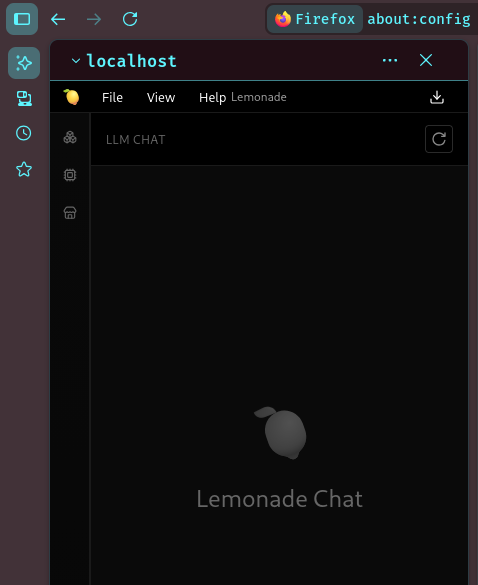
Now when you click on the ai button in the side menu the lemonade server interface will show!
Integrate with ZED
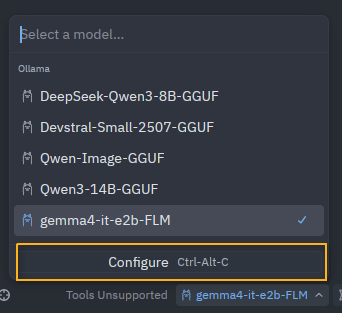
Open zed and click the AI button. Click the model drop down and select configure.
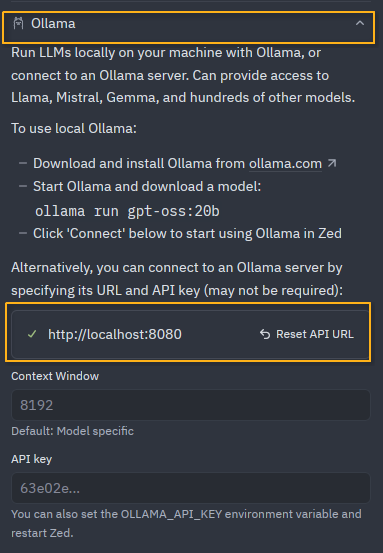
In the configure window select Ollama and set the url to http://localhost:8080
click the back button at the top and you're good to go!
Conclusion
The sky is the limit now, the lemonade server provides both an ollama sytle API and an OpenAI api for things to interact with so integrate it with what ever you want!